 PetCare Tracker
Getting started: your first pet
From the first launch to your first pet with a medication reminder. It takes about two minutes and needs no account.
1Tell the app who is doing the caring
On the welcome screen tap Get started. The app asks Who is doing the caring? Type Your name – it signs each dose you log. Email is optional.
Tap Continue. There is no sign-up behind this: your name and email stay on the phone.
2Add your first pet
On My Pets tap Add a pet. A four-step wizard opens; the bar at the top shows Step 1 of 4.
Step 1: pick the kind of pet – Dog, Cat, Bird or Rabbit – and optionally the Breed.
Tip: Hamster or reptile? Pick the closest option now and change the species later in the pet’s profile (pencil icon → Species).
3Name and avatar
Step 2: type the Pet’s name and choose one of the illustrated avatars. The Photo tile opens the camera if you want a real photo straight away.
4A few details
Step 3: Age, Weight, Sex, the Primary vet and the Microchip ID. Everything here is optional.
Typing a vet’s name creates a vet entry; you can add the phone number and address later in Settings → Vets.
5Add a first medication – or skip it
Step 4: type the Medication name, then the Dose (e.g. “1 tablet”), how often (Daily, Weekly or As needed) and the Reminder times. + Add time adds another time of day.
Tap Finish setup. No medication yet? Tap Skip for now and add it later.
6Allow notifications
After you save the first medication, the phone asks whether PetCare may send notifications. Tap Allow – without it the app cannot remind you that a dose is due.
Reminders are planned by the phone itself. Nothing goes through any server.
Tip: Declined by mistake? Turn notifications on in the phone settings (Apps → PetCare Tracker → Notifications), then in the app under Settings → Dose reminders.
7Your pet is in My Pets
The My Pets tab shows every pet with the next dose. Tap a card to open the pet’s profile with medications, health log, feeding, vet visits, records and the emergency card.
Your avatar in the top right corner opens Settings. The tab bar at the bottom switches between Pets, Today and History.
Tip: Next: Medications and reminders.
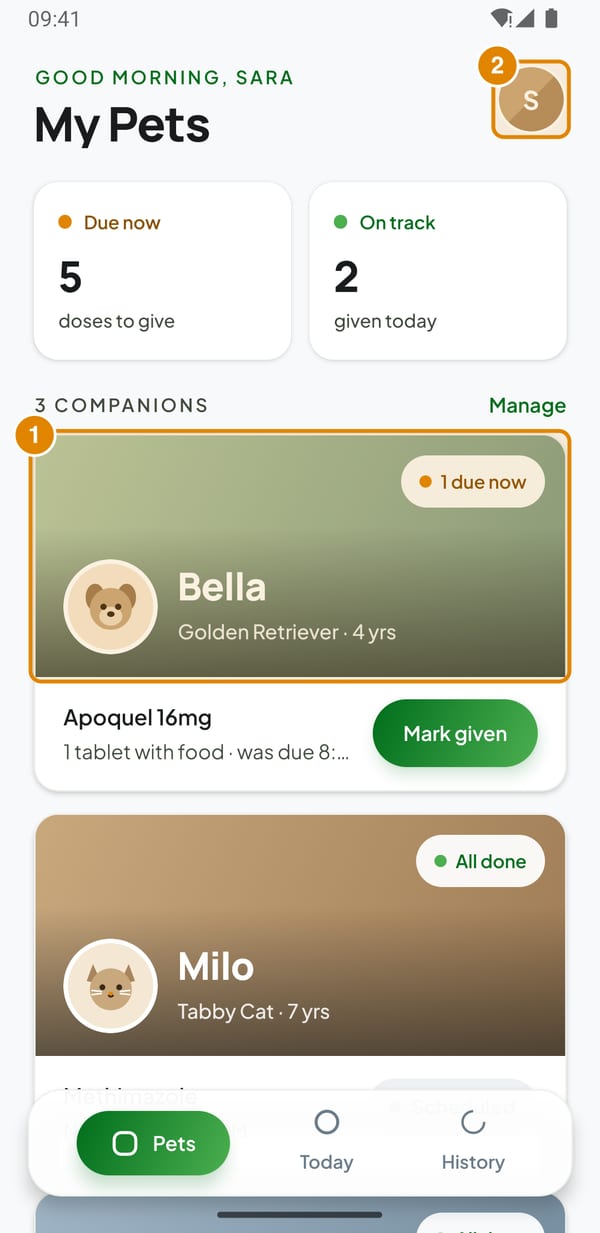
- Pet card – Opens the pet’s profile
- Your avatar – Opens Settings